CLI changelog

Stay up to date with the latest updates and improvements to Kiro.

Follow us:Bluesky,X,Discord,andLinkedIn
2.17.0CLI

This release introduces cloud sessions in preview: run your session in a managed cloud sandbox with --cloud, disconnect while the agent keeps working, and resume from any machine. The slash command menu also gains substring matching, and typing in the TUI stays smoother during rapid input.

Cloud sessions (preview)

Cloud sessions let you run Kiro CLI in a managed cloud sandbox instead of on your machine. Start one with kiro-cli --cloud (or kiro-cli chat --cloud), attach repositories with --repo or the /repo picker, then disconnect while the agent keeps working and resume later from any machine with --resume-id. Cloud and local sessions appear together in the session picker. Learn more ->

For organizations using IAM Identity Center, administrators manage Cloud Sessions with the Cloud Sessions (Preview) setting, formerly Kiro Web (Preview). Organizations that enabled the prior setting remain enabled; new organizations must opt in before users can start Kiro Web sessions.
2.16.0CLI

This release introduces tangents: branch into side-conversations that inherit your full conversation history, explore freely, then jump back exactly where you left off. /context also gains a per-tool token breakdown so you can see what's consuming your context window.

/tangent side-conversations (v3)

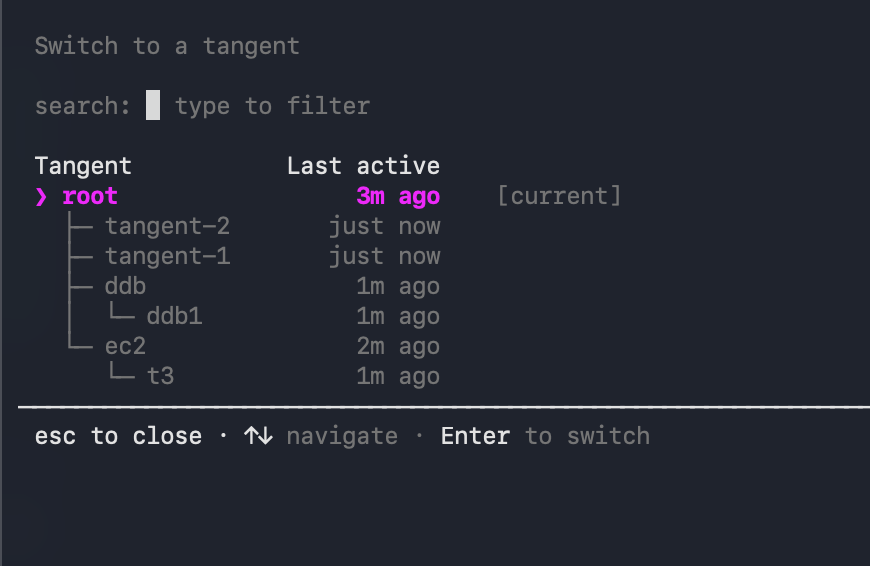
Loading image...The tangent picker opened by /tangent ls, titled "Switch to a tangent" with a search filter. It shows a conversation tree: root marked as current, with branches tangent-2, tangent-1, ddb (containing ddb1), and ec2 (containing t3), each showing when it was last active. A footer lists esc to close, arrow keys to navigate, and Enter to switch.

Need to look something up mid-task without polluting your main thread? /tangent branches into a side-conversation that inherits everything discussed so far — explore freely, then jump back to exactly where you left off. Create named tangents with /tangent <name>, browse your whole conversation tree in a visual picker with /tangent ls, and jump straight back to the main conversation from any depth with /tangent root. Available in V3 mode (kiro-cli --v3). Learn more ->

2.15.0CLI

This version adds a guided description step to /spec new and makes Plan mode execute your approved plan automatically without a manual mode switch.

Guided spec creation (v3)

/spec new now asks what the spec should cover before drafting requirements. Instead of guessing from the spec name alone, the agent uses your description as the ground truth for the requirements it generates. Learn more ->

Plan auto-execution (v3)

In Plan mode, approving a plan now kicks off execution immediately. You no longer need to manually switch modes after reviewing and accepting the plan. Learn more ->

2.14.0CLI

This release introduces /upgrade-agent to migrate V2 custom agent configurations to the universal format, automatic retries for interrupted model responses, and quality-of-life improvements across both modes.

/upgrade-agent (v3)

Migrate V2 agent configuration files to the universal format that works with both V2 and V3. Run /upgrade-agent inside a V3 session to convert your existing custom agent configs in place the command reads your V2 configuration and produces an updated file compatible with both modes. Available in V3 mode (kiro-cli --v3). Learn more ->

2.13.0CLI

This release brings two new capabilities to CLI 3.0 (early access) a built-in subagent for learning Kiro's features and global hooks that apply across all workspaces alongside error handling fixes for all users.

Introspect Subagent (v3)

Ask questions about Kiro's features and get accurate answers in-line. The new introspect subagent can explain capabilities, walk you through writing custom agents, hooks, and steering files, and suggest the right configuration for your workflow. Available in V3 (kiro-cli --v3).

Global Hooks (v3)

Define hooks once and have them apply everywhere. Hooks placed in ~/.kiro/hooks/ now fire in every workspace automatically, so cross-cutting behaviors like linting on save, security checks before commits, or custom approval gates no longer need to be duplicated per project. Workspace-level hooks continue to work alongside global ones. Available in V3 (kiro-cli --v3).

MCP OAuth now supports servers with strict requirements, like Figma. Configure a client secret for servers that require one, point the redirect URI at a custom callback path, and skip Dynamic Client Registration when you bring your own client ID. This release also brings more accurate approval prompts for commands with combined flags, and full ASCII mode coverage for terminals without Unicode support.

MCP OAuth for Pre-Registered Apps

Connect to remote MCP servers that require a pre-registered OAuth app. Add clientSecret alongside clientId in your server's OAuth config for servers that require a client secret. When a custom clientId is set, Kiro skips Dynamic Client Registration and authenticates as your app. The redirectUri field now accepts full URLs with custom paths (like http://localhost:7778/oauth/callback), so your callback URL can match exactly what your app registered. Callback hosts are limited to localhost for safety. Learn more ->

2.11.0CLI

This release adds dedicated commands for managing OAuth authentication on remote MCP servers, so you no longer need to restart sessions or manually clear credentials when auth flows get stuck. The /usage display also gets a refresh to reflect the new prepaid credits model.

MCP Authentication Management

Three new commands give you full control over OAuth credentials for remote MCP servers. /mcp auth forces re-authentication when a token has expired or become invalid, /mcp cancel-auth aborts a pending auth flow that's stuck waiting for browser confirmation, and /mcp logout removes stored credentials entirely. Keyboard shortcuts are also available in the MCP panel status view: ^A to force auth, ^X to abort, and ^R to remove credentials. Learn more ->

2.10.0CLI

This release removes friction from MCP iteration and gives custom agent authors tighter control over context. Agent and MCP configs now reconcile live when you save a change, without restarting the session or losing conversation history. A new setting also lets custom agents opt out of inheriting default resources.

MCP and Agent Config Hot-Reload

Agent and MCP configurations now hot-reload when you save changes on disk. Edit an agent config, add a new agent file, or modify mcp.json and the changes take effect without restarting the session. Only affected servers restart, and your conversation context is preserved. The config diff is order-independent, so reordering environment variables won't trigger unnecessary restarts. Learn more ->

Custom Agent Resource Inheritance

The new chat.disableInheritingDefaultResources setting stops custom agents from inheriting default steering, skills, and AGENTS.md. Set it to true when you run only custom agents and don't want global resources pulled in. Since v2.7.0, custom agents inherit default resources automatically. This setting gives you a way to turn that off. Learn more ->

2.9.0CLI

This release fixes session expiration for Entra ID (Azure AD) users, resolves approval prompt loops for compound shell commands in V3, and adds compact tool card previews for sub-agent calls.

2.8.0CLI

This release introduces an early access preview of Kiro CLI V3. The new harness runs alongside your existing 2.x install, so you can try it without disrupting your current setup. Run kiro-cli --v3 to opt in.

Loading image...Image

Kiro CLI 3.0 is built on the same unified agent harness that powers the Kiro IDE and Kiro Web. Every improvement to the harness now ships to all surfaces simultaneously. V3 introduces spec-driven development in the terminal, a capability-based permissions model, enhanced hooks with a standalone file format, and tag-based agent configuration. Your existing 2.x setup is unchanged until you opt in with kiro-cli --v3. Learn more ->