Web changelog

Stay up to date with the latest updates and improvements to Kiro.

Follow us:Bluesky,X,Discord,andLinkedIn
Web

You can now bring your personal .kiro configuration into Kiro Web. From Settings > Configuration Sync, upload local Steering, custom agents, Hooks, Skills, Powers, or MCP settings for use in every cloud session. Learn more ->

Review before uploading

Select or drag one supported top-level folder, such as skills/ or agents/, from your local .kiro directory. Kiro checks each file against its cloud copy before uploading. New files are selected by default, while updates that replace cloud content require your input. Steering files and MCP servers include a side-by-side comparison.

Manage configuration from settings

Uploaded items appear on their matching settings pages, where you can view, edit, download, or delete each one. Steering, Skills, Agents, Hooks, and Powers each have their own page under Settings, and uploaded MCP servers appear with your MCP server settings. Catalog Powers are installed by name, and custom Powers upload as text files.
Web

Your agent doesn't stop at writing code anymore. With Playwright and the agent-browser CLI available in its sandbox, it can open the app it just built in a real browser, click through the flows, reproduce browser-based bugs, and verify UI changes before you ever look. Ask for a fix and get one that's already been checked in a browser. Learn more ->

Web

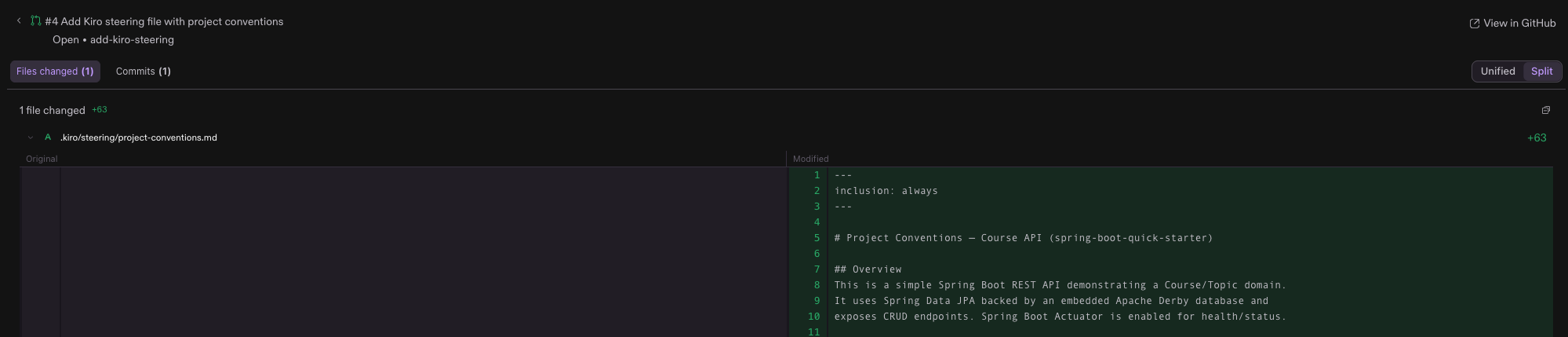
The moment your agent opens a pull request, it surfaces right in your session. The Reviews panel appears on its own and lists every pull request from the session; select a GitHub pull request to walk its status, commits, and changed files with unified or split diffs, all without losing your conversation. When you're ready to review or merge, one click opens it in GitHub. Learn more ->

Loading image...Pull request #4, "Add Kiro steering file with project conventions", open in Kiro Web. The header shows the Open status on branch add-kiro-steering with a View in GitHub link, above Files changed and Commits tabs and a Unified or Split diff toggle set to Split. One added file, .kiro/steering/project-conventions.md, is shown as a side-by-side Original and Modified diff with 63 added lines, beginning with inclusion: always frontmatter and a Project Conventions overview for a Spring Boot REST API.
Web
Web

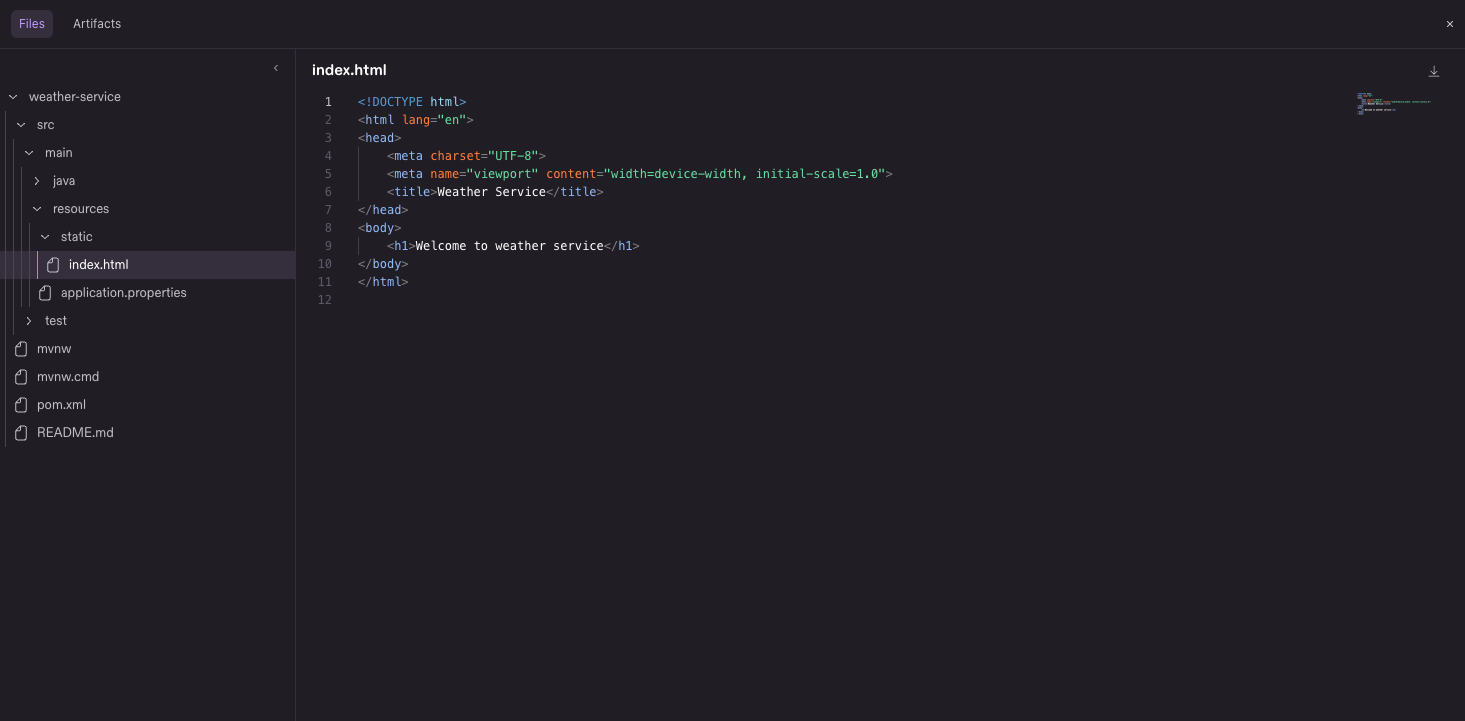
Your agent just built something in its cloud sandbox. Now you can look around. Browse the session's workspace right in Kiro Web, open any file the agent creates or edits in a syntax-highlighted viewer, preview markdown and images, and download what you need. File paths in agent responses are links, so you can jump from "I updated the forecast page" to the actual file in one click. Learn more ->

Loading image...Kiro Web workspace file explorer with the Files tab selected. The left panel shows an expanded weather-service repository tree, with index.html selected under src/main/resources/static alongside application.properties, test, mvnw, pom.xml, and README.md. The right panel shows the syntax-highlighted contents of index.html with line numbers and a download button.
Web

This release gives the sandbox direct access to your AWS resources and streamlines connecting Powers to services like Figma, Stripe, and Supabase.

IAM Role For Sandbox

Configure an IAM role that Kiro Web assumes on your behalf when running tasks. The sandbox receives short-lived credentials that the agent, CLI tools, and MCP servers can all use to interact with your AWS resources. Credentials refresh automatically while the task runs and are removed when it completes. Set up the role in Settings > Agent > Sandbox > AWS Credentials. Learn more ->

Authorize Powers for Third-Party services

Powers that connect to third-party services now use a standard authorization flow. Authorize once from Manage Powers in your Agent settings, and the agent uses the connection for all future tasks without prompting again. Disconnect at any time to immediately revoke access. Tokens are encrypted at rest and never exposed to the sandbox or the agent. Learn more ->

Web

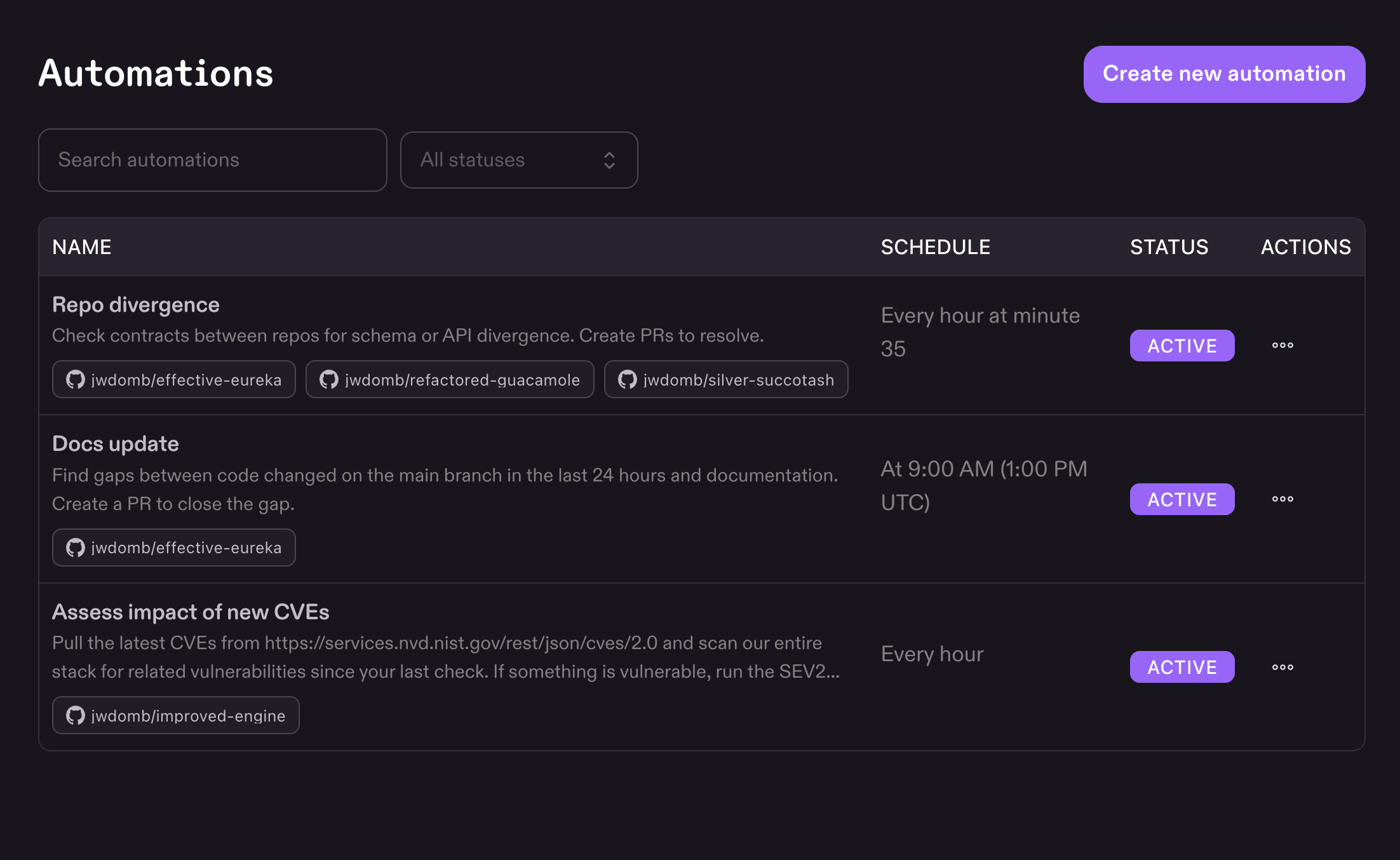
You can now schedule recurring work in Kiro on the web. Create an automation, describe the task, select repositories from GitHub or GitLab, and set a schedule. Kiro runs it on that cadence in its own sandbox and opens a pull request when done.

Loading image...Image

Go to Automations in Kiro on the web to set up scheduled tasks. Add up to five schedules per automation using built-in options (hourly, daily) or a cron expression. Each run spins up an independent sandbox, clones your repositories, executes the work autonomously, and opens a pull request with the changes. Edit, disable, or delete automations at any time. Changes apply to the next scheduled run. Learn more ->

Web

This release expands Kiro Web beyond GitHub with full GitLab support and brings the Specs workflow to the browser. Connect GitLab repos with a personal access token, and plan work as reviewable requirements, design, and task files before the agent writes a line of code.

Connect your GitLab repositories

Work on GitLab repositories the same way you work on GitHub. The agent clones your repos, writes code, and opens merge requests on your behalf. Connect with a personal access token, inspect existing merge requests and review issues without leaving the chat, and mix GitLab and GitHub repos in a single session. Learn more ->

Specs in the browser

Describe what you want to build, fix, or plan, and Kiro generates requirements, design, and task files for you to review before work begins. Edit the plan through chat, run every task or just the ones you select, and download the artifacts when you're done. A single spec session can span multiple repos, with the agent planning across all of them. Learn more ->

Web

You can now start a Kiro Web session without connecting a GitHub repo first, and switch to Autonomous mode at any point in a Vibe session, not just at the start. This update also brings relative message timestamps, clearer network mode visibility, and a round of sandbox and reliability fixes.

Start without a GitHub repo

You no longer need to add a GitHub repository to start a session. Open a session, describe your task, and connect a repo later if you need one.

Switch to Autonomous mode mid-session

In a Vibe session, you can now select Autonomous mode after your first prompt, not just at session start. Hand off to the agent whenever you're ready without starting over.

Message timestamps

Session messages now show relative timestamps. Hover to see the absolute time, making it easier to track when events occurred during long-running tasks.

Web