Loading image...Kiro

Product

  • About Kiro
  • Agents
  • IDE
  • CLI
  • Web
  • Mobile
  • Crew
  • Pricing
  • Downloads

For

  • Enterprise
  • Startups
  • Students

Community

  • Overview
  • Ambassadors
  • Case studies
  • Discord
  • Events
  • Powers
  • Shop
  • Showcase

Resources

  • Docs
  • Blog
  • Changelog
  • FAQs
  • Videos
  • Report a bug
  • Suggest an idea
  • Billing support

Social

Site TermsLicenseResponsible AI PolicyLegalPrivacy PolicyCookie Preferences
Loading image...Kiro
  • Agents
  • Enterprise
  • Pricing
  • Docs
SIGN INDOWNLOADS
Loading image...Kiro

Get Started

InstallationAuthenticationYour first project

Models

OverviewAvailable modelsReasoning effortAWS GovCloud (US) models

Features

How Kiro worksLocal command sandboxACP integrations
Specs
Steering
Hooks
MCP
Permissions
Custom agents
Workflows
Agent Skills
Powers
Cloud sessionsMemoryCompactionKiroignoreCheckpoints and rewind
Built-in tools
Configuration scopes

IDE 1.x

What's new in 1.0
Setup & First Run
Editor
Chat
Experimental
Troubleshooting0.x reference

CLI

What's new in V3
Setup & First Run
Terminal UI
Chat
Fullscreen modeVoice modeHeadless modeACPAuto complete
Experimental
2.x reference

Crew

Quick startInstallationRunning 24/7
Chat
Agent Capabilities
Features
Interfaces
Apps
System & storageConfigurationSecurityTroubleshooting

Web

Setup & First RunIdentity Center
Connect your repositories
Working with the agent
Autonomous modeScheduleConfiguration Sync
Sandbox

Mobile - Preview

Overview

Commands and Reference

CLI commandsSlash commandsBuilt-in toolsExit codesSettings

Billing

OverviewManaging your subscriptionUpgrading your planDowngrading your planCancelling your planPurchasing add-on creditsManaging your paymentsManaging usage notificationsManaging your taxesContacting billing supportDeleting your accountRelated questions

Enterprise

ConceptsOnboarding quickstart
Connecting your identity provider
IAM Identity Center
Okta
Microsoft Entra
Deployment optionsSubscribe your teamManage subscriptions
Governance
Monitor and track
SettingsManaged updatesBillingIAMSupported regions
AWS GovCloud (US)

Privacy and Security

OverviewData protectionCode referencesCompliance validationInfrastructure securityIAM permissionsFirewalls, proxies, and data perimetersVPC endpoints (AWS PrivateLink)

Guides

OverviewRunning Kiro in the cloud
Language support
Learn by playing

Migration

Migrating from Q DeveloperMigrating from VSCodeUpgrading from Q CLI
  1. Docs
  2. Enterprise
  3. Connecting your identity provider
View as Markdown

Connect an Identity Provider

View as Markdown

Kiro supports connecting to your external Identity Provider directly or through AWS IAM Identity Center.

Loading image...identity store selection
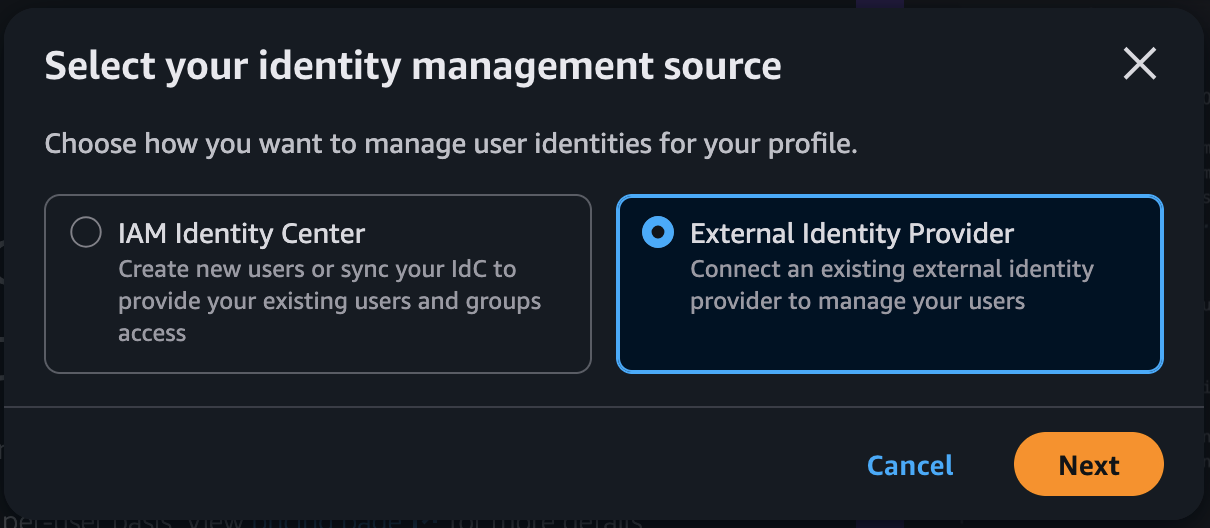
Kiro supports connecting to the following identity sources:

  • IAM Identity Center
  • External Identity Provider (Direct)
    • Okta
    • Microsoft Entra ID

Once the identity provider is connected, you can subscribe those users or groups to Kiro as described in the subscription guide.

Kiro Enterprise profiles in AWS GovCloud (US) can also connect a custom OIDC provider with just-in-time subscriptions. This option is not available in commercial AWS Regions.

Page updated: October 17, 2026
Onboarding quickstart
IAM Identity Center